RpnCalc 12C Financial Calc
Calculations are far faster, doing in a fraction of a second what the classic calculator could take minutes to compute.
It also includes scientific and basic modes.
No ads, no spyware.
The only permission it asks for is to save and recall programs.
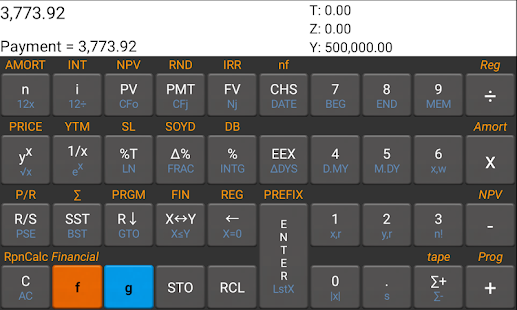
RpnCalc Financial is a highly versatile full-function programmable financial calculator.
It includes math, finance, statistics, and scientific functions.
Features include:
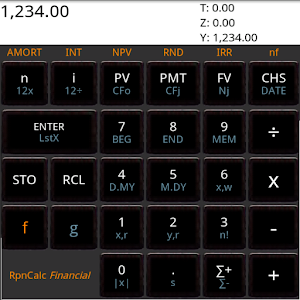
* Time value of money (TVM)* Amortization* Cash flow analysis: IRR, NPV* Bond pricing* Date and interest calculations* Percentages, markups, percentage of total* Scientific mode* Basic (large key) mode* 20 Memories* 99 Program steps* Key click (haptic feedback)* Continuous memory
Improvements over the classic HP 12C Financial Calculator:
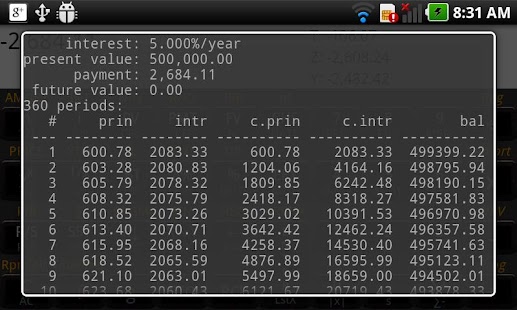
* 16-level stack (configurable)* Front four stack elements always displayed* Programs can be saved and restored by name* Programs displayed symbolically* Memories are not sacrificed to make room for program steps* Full amortization display, register display, NPV display, and program display.* "Calculator tape" feature records all your actions and lets you share the recording
See http://www.efalk.org/RpnCalcFinancial for a full description and documentation.
RpnCalc Financial has a sixteen-level stack to hold more data.
The front four elements on the stack are visible at all times, making it much easier to keep track of where you are in your calculations.
Calculator programs are stored and displayed symbolically, making programming much easier.
Programs can be stored and retrieved from the external memory whenever your Android is in file-sharing mode.If you want to "test drive" a similar calculator before purchasing, try the free "RpnCalc" scientific calculator.
Oh, and heres the privacy policy: RpnCalc never collects any private data of any sort.
It never connects to the internet.
It doesnt even run ads.
About RpnCalc 12C Financial Calc
- Package name (App ID)
- org.efalk.rpncalcprofessional
- Available on
- Google Play
- Price
- Free
- Developer
- HP inc.
Looking for the RpnCalc 12C Financial Calc APK?
The safest way to get RpnCalc 12C Financial Calc (org.efalk.rpncalcprofessional) on your Android device is to install it directly from Google Play — you'll always get the latest official version, automatic updates, and no risk of modified or infected APK files from third-party sites.
Social Features
Connect and share with friends and the community.
Gaming Features
Enjoy immersive gaming experience with various game modes.
Financial Tools
Manage your finances and track your expenses easily.
See RpnCalc 12C Financial Calc in Action

Frequently Asked Questions
Is RpnCalc 12C Financial Calc free?
Yes, RpnCalc 12C Financial Calc is free to download and install on Android through Google Play.
How do I install RpnCalc 12C Financial Calc on Android?
Open Google Play on your Android phone or tablet, search for RpnCalc 12C Financial Calc by HP inc. or tap the Google Play button on this page, then tap Install. The app downloads and installs automatically.
What is org.efalk.rpncalcprofessional?
org.efalk.rpncalcprofessional is the App ID (package name) of RpnCalc 12C Financial Calc on Google Play. Every Android app has a unique package name, and it is the safest way to verify you are installing the official app.
Is RpnCalc 12C Financial Calc safe to download?
Installing RpnCalc 12C Financial Calc from Google Play is the safest option: you get the official version published by HP inc., verified by Google Play Protect, with automatic updates. Avoid APK files from unofficial third-party sites.
Get RpnCalc 12C Financial Calc Today
RpnCalc 12C Financial Calc for Android — free download on Google Play.
Compatible with Android phones and tablets — available on Google Play.
Ask AI about this app
Get instant answers about features, tips and more from popular AI assistants.